
What is a finding aid?
A finding aid is a document created by archivists that provides a roadmap or table of contents to the records in an archival collection, including a file- or item-level inventory, subject headings, links to related collections, and other useful contextual information. Finding aids ensure the authenticity and discoverability of and access to collections material for both researchers and archives staff alike, making them a crucial element to any archives operation.
Now that you know what a finding aid is, you’ll appreciate how proud and excited we are to announce the launch of our new finding aids site!
Launched in 2009, our previous finding aids site was the access point to our collections during a period where several major collections overhauls were performed by several different people. From 2009 to 2026, many of our collections were processed and made available to researchers for the first time; some of our older collections were reprocessed, providing increased visibility and better access to those collection; and we migrated finding aid data from an older archival management program (Archivists’ Toolkit) to the current one (ArchivesSpace), affording us the ability to leverage the advancements of technology to provide better research access to our collections, but also requiring a fair amount of data cleanup that we continue to address to this day. All the while, we continued to acquire new collections material and additions to pre-existing collections on a daily basis.
New Features
With our new site, we are proud to have incorporated some new features that we hope will make for a more efficient and enjoyable researching experience, providing access to to the 2,000+ archival collections stewarded by Z. Smith Reynolds Library Special Collections & Archives.
Improved Searching and Results
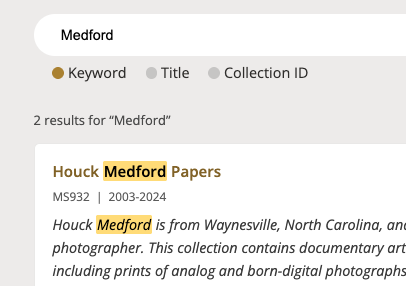
From the homepage search bar, you can search by any keyword, collection name, call number, or any other text. Simply put, if you search for a keyword and that keyword exists anywhere in a finding aid, that finding aid will be in the list of results. What is new and improved to this finding aids site is the accuracy of the results list, sorting better by relevancy than the previous site.
“On this page” section
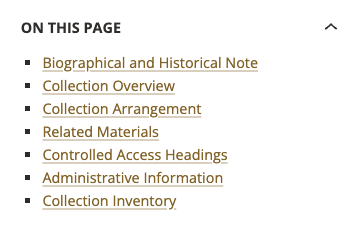
Another added feature is the “On this page” section, found toward the top-left of every finding aid, just above the Summary Information. This section allows you to jump from section to section in the finding aid. Especially for larger collections, it is easy to get lost in the long scroll of a finding aid with tons of information, so this feature allows you to more easily navigate your way around.
“Search the inventory” vs. Ctrl+F
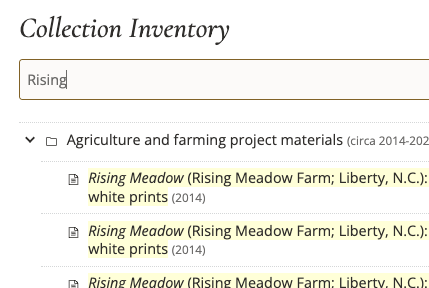
Once you reach the Collection Inventory—or file-/item-level breakdown of the collection—you will see a search bar that reads, “Search the inventory.” Entering any keywords will alter the contents of the Collection Inventory section in real-time, showing you only results that contain your keyword(s). This is an additional search feature to the Ctrl+F (Command (⌘) + F on Macs) method, which will search the entire finding aid, not just the Collection Inventory.
Links to Digital Collections
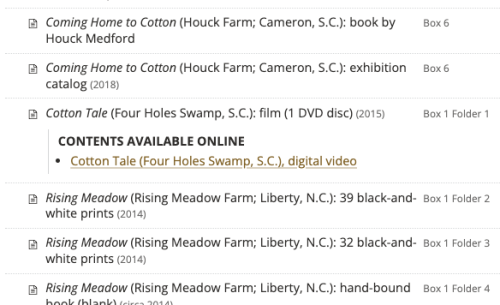
Another additional feature is the ability to link directly to digitized archival content. While not every archival document is available online, we work hard to make as much of our collections material available digitally, adding new digital content nearly every day. We are now also working hard to link to the digitized material directly from the finding aid with this new linking feature.
Bookmarks
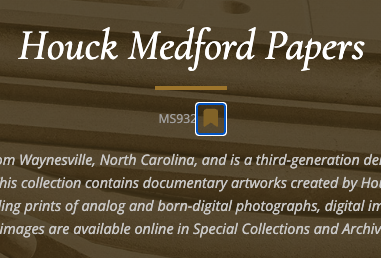
Lastly, if you are interested in coming back to the finding aid that you are reviewing, you can click the bookmark icon located under the collection title. When you are ready to return to the finding aid, click on the “Menu” button in the top-right corner of any finding aids site page, then select “Bookmarks”.
Shoutout and Next Steps
While Rebecca May (Head of Public Services for Special Collections) and I did play a role in helping determine some aspects of the new finding aids site, all credit and thanks must go to Kevin Gilbertson (Web Services Librarian) for his thoughtful and excellent work designing and implementing the new site, migrating all of the data from the old site (then decommissioning the old site), establishing the continuity from the old site to the new site and ensuring that all old permalinks are still viable while establishing a new permalink format, solving a series of technical issues that has resulted in fewer steps for those of us processing archives at the Z. Smith Reynolds Library, and all other technical aspects related to implementing and maintaining our new site. Everything discussed in this blog post is the work of Kevin, so thank him if you find this site to be useful to you. Chapeau, Kevin!
While Kevin has done the hard work of improving access to our finding aids, it is now up to us at Special Collections & Archives (myself in particular) to continue working to improve the quality of the underlying data in our finding aids themselves, including addressing issues related to subject headings and name authorities and re-processing collections both physically and intellectually as needed. We are also working on creating new and editing existing MARC records for archival collections. Once we have a quality catalog record for every finding aid, our catalog will then provide another access point to our finding aids and the archival materials they illuminate alongside our other cataloged materials.
As always, please reach out to us at Special Collections & Archives through our Contact Us form or send us an email at archives [at] wfu [dot] edu to request research assistance, collection use, and materials reproduction.
Thank you and Happy Researching!
2 Comments on ‘News from Special Collections & Archives: New Finding Aids Site is Live!’
Thank you, Sam, Rebecca, and especially Kevin! Researchers depend on our finding aids, and this updated access will help them reach more of our resources.
Congratulations to all involved in this important work.